Recurring subscriptions
Weekly, monthly, quarterly, bi-annual, and yearly billing periods. Automatic next-billing-date tracking and trial period support.
Loading...
We use cookies to analyze website traffic and improve your experience. You can accept or decline analytics cookies. Learn more
Billy is the free expense tracker that works completely offline. Track subscriptions, scan receipts, set budgets — without a bank login or an account.
Scan to download
Scan with your phone camera to download Billy instantly

All product names, logos, and brands are property of their respective owners. Shown for illustrative purposes only.
From the next bill to the bigger picture. Explore the real app screens at your own pace.
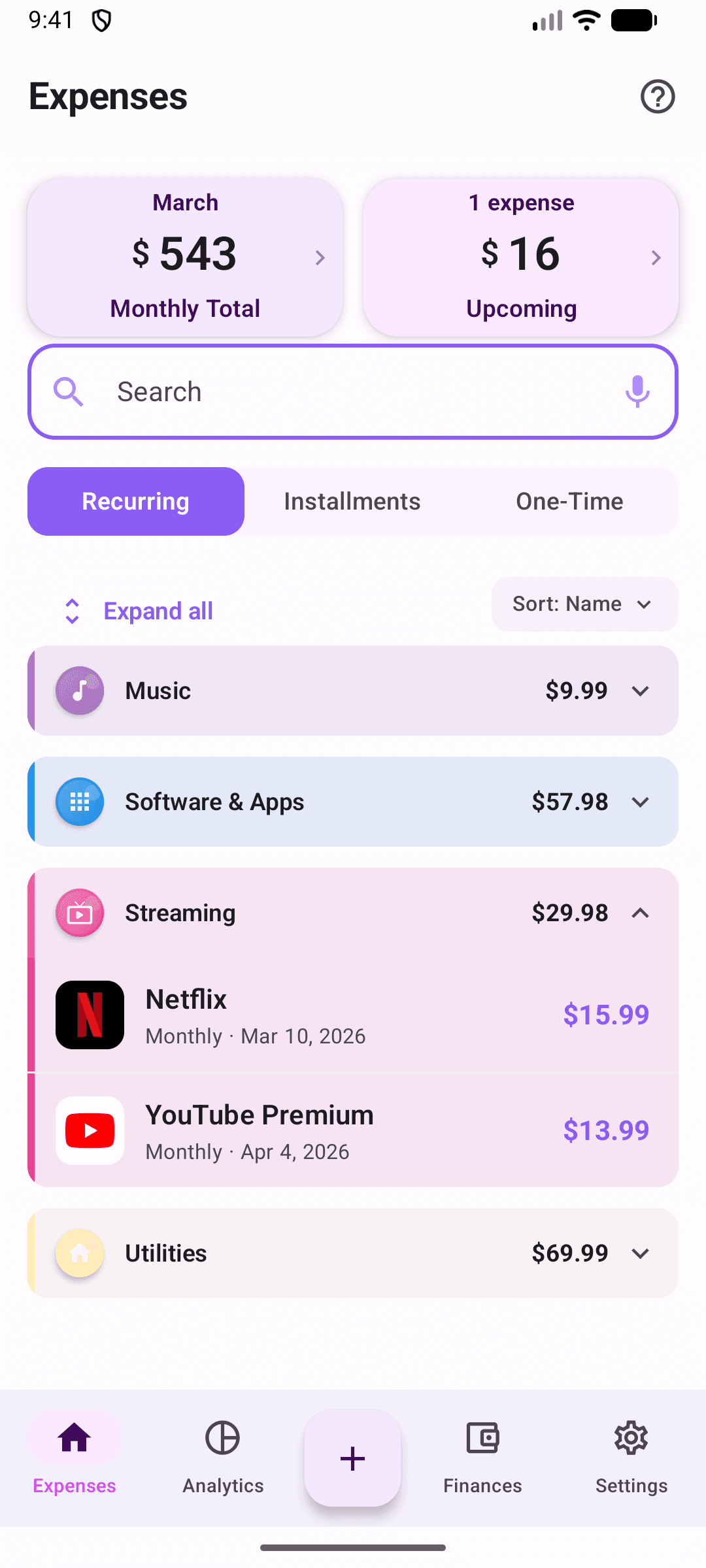
See the subscriptions you have added, their billing dates, and your monthly total in one place.
Free on iOS and Android. No bank login needed.
Actual app screen with example expenses.
A 36-second walkthrough recorded in the Android app, using sample expenses. See a subscription being added, explore spending, and check the finances overview. No sound needed.
The free version stores everything locally on your device. Protect access with fingerprint, face unlock, or PIN. No account or bank connection needed to start. Pro adds optional cloud sync.
Keep upcoming bills, everyday purchases, and your budget in one place. These three essentials are included free.
Weekly, monthly, quarterly, bi-annual, and yearly billing periods. Automatic next-billing-date tracking and trial period support.
Snap a receipt, review the amount, merchant, and category, then save it without typing everything by hand.
Overall or per-category budgets with weekly, monthly, or yearly periods. Get notified before you blow past a limit, not after.
Track down payment + monthly installments + remaining balance + completion month. Built for financed phones, appliances, and furniture.
Face ID, Touch ID, or fingerprint protects every screen. PIN fallback when biometrics aren't set up. No data leaves your phone on the free tier.
Share subscriptions, expenses, budgets, and savings goals with one other person. Edits sync in real time. Owner controls edit permissions.
Interactive charts for spending trends, category breakdowns, and month-over-month comparisons. Plus a forecast of where you'll land this month.
17 presets plus unlimited custom categories. ML suggestions based on merchant name, color-coded with custom icons.
Track income from multiple sources alongside expenses. Set savings goals with target amounts, deadlines, and priority levels.
Notifications before bills are due, when budgets run low, when trials end, plus an optional monthly spending summary.
Every upcoming bill plotted on a calendar. Know exactly when each payment hits.
Import from Excel, CSV, or QR code via our web tool. Export to CSV. Full JSON backup and restore for everything in the app.
Start free and upgrade when you need cloud sync and advanced features. No hidden fees.
Everything you need to track expenses locally
Sync across devices & unlock all features
US reference price. Local pricing and trial eligibility are shown in the app before you subscribe.
Download first, then choose Pro inside the app.
Upload a spreadsheet or type expenses manually in your browser. Then scan the QR code or download the file to import into Billy. Importing into the app requires Billy Pro.
Ready for more control?
Track subscriptions, scan receipts, set budgets, and see exactly where your money goes. Works offline. No account needed to start. Free forever on iOS and Android.
Read tips, analyses, and experiences about tracking expenses, organizing finances, and making better spending decisions.
Everything you need to know before getting started with Billy.
Yes. Track unlimited expenses and subscriptions, scan receipts, set budgets, and get payment reminders for free. Your expenses are stored locally, so you can start without an account or a bank login. Pro adds cloud sync, household sharing, and import/export tools.
Billy is available on iPhone and iPad through the App Store, and on Android through Google Play.
Pro adds cloud sync, sharing with one other household member, spreadsheet and QR imports, CSV export, and full JSON backup and restore. The US reference price is $2.99/month. Local pricing and trial eligibility are shown in the app before you subscribe. Upgrade from inside Billy after downloading the app.
No bank connection is needed. Add your expenses and subscriptions yourself, scan a receipt, or import a spreadsheet with Pro. Billy tracks what you add; it does not automatically discover subscriptions in your bank account or cancel them for you.
Yes. You can track expenses locally without an internet connection. Pro cloud sync and household sharing need an internet connection to keep devices up to date.
Yes. Billy includes 17 default categories, plus custom categories with your own colors and icons. Budgets can cover your overall spending or an individual category.
Yes, with Pro. Use the Import tool on this website to prepare Excel or CSV data, or enter expenses manually. Then transfer them to Billy using a QR code or an import file.
Local data can be lost when you uninstall Billy or lose your phone. Pro includes backup/export tools and cloud sync. Before uninstalling, save a backup or confirm your latest data has synced. Local-only use is not a cloud backup.
Manage your subscription through the store where you subscribed: Apple Settings > your name > Subscriptions on iOS, or Google Play > Payments & subscriptions > Subscriptions on Android. Your store shows the renewal date and any applicable trial terms.